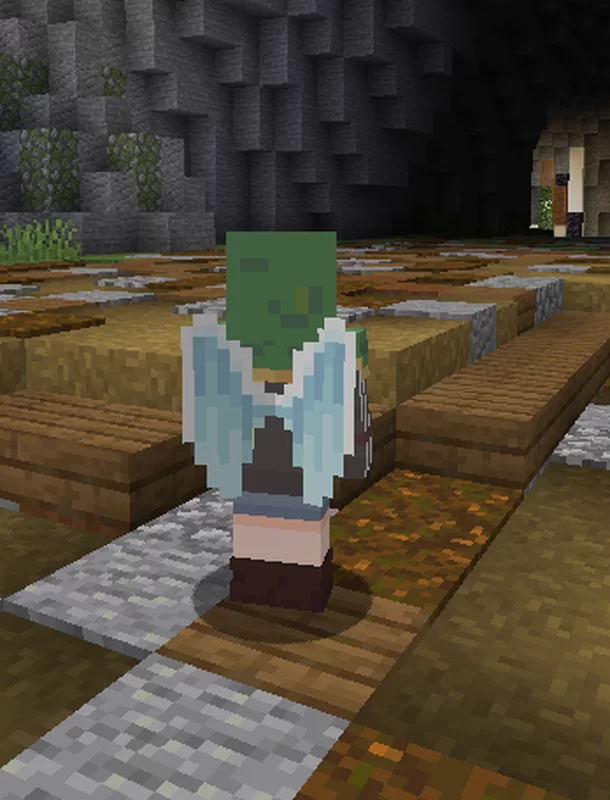
MagicShader — for Minecraft Java
by ArubikU
Edit your playermodel without optifine. Made by ArubikU, it leans vanilla-like. It runs on Minecraft 1.19.4 – 1.21.1 as a regular resource pack. Licensed MIT, so the download is mirrored right here on MineSpecs — no ads, no redirects.
This file: Minecraft 1.20.4 – 1.21.1 · resource pack (core shaders)
Licence: MITOriginal projectSource codeVersion 1.2
SHA-1 4d023f7b01b301d2cbb613122fbfe57c516ade95
Identical to the release on Modrinth.
How to install MagicShader
- 1No shader loader needed — MagicShader uses Minecraft’s own core shaders, so it installs like a resource pack on Minecraft 1.20.4 – 1.21.1.
- 2Download the MagicShader
.zipfrom the button above — keep it zipped. It is mirrored on MineSpecs, so there is no ad-gate or redirect. - 3Drop the .zip into your
.minecraft/resourcepacksfolder (%appdata%\.minecraft\resourcepackson Windows,~/Library/Application Support/minecraft/resourcepackson macOS). - 4Launch the game, open Options → Resource Packs, move MagicShader to the right-hand column and click Done.
First time? How to install Minecraft resource packs
Performance & what to expect
ArubikU gives MagicShader no performance rating, so check your frame rate at your usual render distance.
More utility shaders
 SkyboxTemplateby Dragoncraft
 8-Bit Trial Chambersby RedstoneEngine
 Chunk Tweaksby Dragoncraft
 Night Mode (Blue light filter)by TheKingOfNerds
 Ascending fadeby DartCat25
 👻Ghost Shader RPby Tagesbw
MagicShader is created by ArubikU and mirrored here under its MIT licence. MineSpecs is an unofficial fan project and is not affiliated with ArubikU, Mojang Studios or Microsoft.