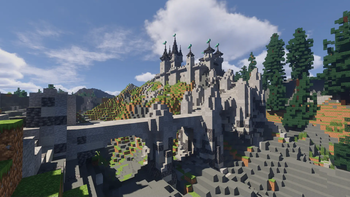
Voyager Shader 2.0 — for Minecraft Java
by 6ix7even
Voyager 2.0 aims at realism without the theatrics: accurate-feeling light, convincing water and reflections, and colour that stays neutral instead of pushing a mood. It is a good showcase pack for builds where you want the architecture to be the subject rather than the sky. Expect it to want real hardware. All Rights Reserved, so grab it from the author's page.
How to install Voyager Shader 2.0
- 1Install a shader loader for Minecraft 1.16 – 1.21 — Iris (pairs with Sodium) or OptiFine. Voyager Shader 2.0 is a shaderpack, so it needs a loader to run.
- 2Download the Voyager Shader 2.0
.zipfrom the button above — keep it zipped. Its licence doesn’t permit re-hosting, so that button takes you to the official modrinth.com page — always the newest build, straight from the author. - 3Drop the .zip into your
.minecraft/shaderpacksfolder (%appdata%\.minecraft\shaderpackson Windows,~/Library/Application Support/minecraft/shaderpackson macOS). - 4Launch the game, open Options → Video Settings → Shaders, and select Voyager Shader 2.0.
First time? How to install Minecraft shaders
Performance & what to expect
Voyager Shader 2.0 is rated high performance impact. It is demanding — treat it as a showcase pack rather than a survival daily-driver, and expect to tune render distance. It renders atmosphere, pbr and reflections. The look is realistic. Because it supports PBR, it looks its best with a matching texture set — browse our free resource packs for one with normal and specular maps.
More realistic shaders
 Gray&Black ShaderPotato impact · by Multiverse
 Luxora ShadersPotato impact · by HoneyStudios
 VelocityPotato impact · by nxghtCry0
 Haze ShaderLow impact · by Smyight
 ReShadedPotato impact · by DR7
Voyager Shader 2.0 is created by 6ix7even and published under its own All Rights Reserved terms. We link to the author’s official download rather than mirroring it — the pack is theirs, and its licence asks that it stay that way. MineSpecs is an unofficial fan project and is not affiliated with 6ix7even, Mojang Studios or Microsoft.